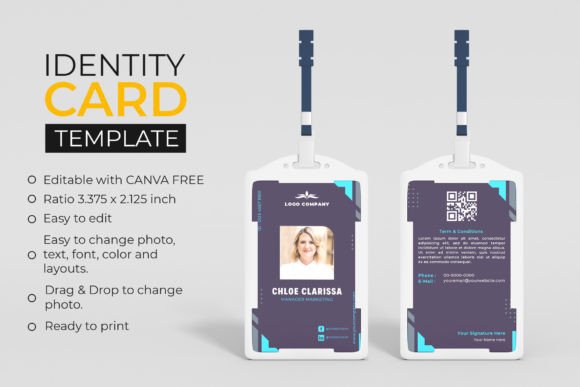
Create Polished Corporate ID Cards Instantly with a Canva Template
Every professional interaction begins with a first impression, and in a corporate environment, nothing sets the tone quite like a crisp, well-designed ID badge. Whether you are onboarding new employees, organizing a large-scale conference, or equipping an agency with staff credentials, the visual quality of your identification cards speaks volumes about your brand's standards. The ID Card Professional Canva Template is designed specifically for this purpose, offering a sleek, dual-sided solution for any corporate entity or agency. It bridges the gap between high-end design and accessibility, ensuring that your team looks unified and authoritative without requiring advanced graphic design skills.
The Anatomy of a Professional Badge
When we talk about professional ID cards, we aren't just discussing a piece of plastic with a photo on it. We are discussing a critical component of your brand identity. This template is built with a standard ratio of 2.125 x 3.375 inches, the industry standard for vertical badges, ensuring they fit perfectly into standard badge holders, lanyards, and clips. The design features a structured layout that balances whitespace with essential information. It avoids the clutter often found in amateur designs, utilizing modern typography and clear visual hierarchy to ensure that the holder's name, title, and photo are immediately legible.
The visual personality of this Canva template is one of understated confidence. It does not rely on flashy gimmicks; instead, it focuses on clean lines and structured grids. This makes it an ideal design asset for industries ranging from tech startups to established law firms. The front side is dedicated to immediate identification—photo, name, and position—while the reverse side is optimized for essential logistics, such as emergency contact numbers, company values, or access instructions. This dual-sided approach maximizes utility while maintaining a minimalist aesthetic.
Why Canva is the Right Tool for Corporate Branding
Gone are the days when you needed a subscription to expensive, complex software to create print-ready materials. The ID Card Professional Canva Template leverages the power of the free version of Canva, democratizing design for entrepreneurs, marketers, and small business owners. The "drag and drop" functionality is not just a marketing buzzword here; it is a practical workflow improvement. You can upload a staff photo, remove the background using Canva’s native tools, and drop it into the designated frame in seconds.
This ease of editing extends to every element of the card. If your company undergoes a rebrand, you don't need to hire a designer to update the badges. You can simply click on the text to change the sans serif font to a serif font if you want a more traditional look, or adjust the color palette to match your new marketing materials. This flexibility ensures that your design assets remain consistent with your evolving brand strategy. It is a practical solution for agencies that manage multiple clients, allowing you to duplicate the template and customize it for different brands without starting from scratch.
Visual Hierarchy and Readability in ID Design
In the context of ID cards, readability is paramount. A badge is often viewed from a distance—across a reception desk or in a busy hallway. The layout of this template prioritizes visual hierarchy. The name is typically the largest text element, followed by the job title and company name. This logical flow guides the viewer's eye naturally from the photo to the most critical text. By using distinct sections for different types of information, the design prevents cognitive overload.
Furthermore, the template is designed to accommodate various font pairings. While the default setting uses a clean, modern typeface, you have the freedom to experiment. For a creative agency, pairing a bold display font for the name with a lighter sans serif font for the details can add a touch of personality. For more conservative corporate environments, sticking to a uniform family of fonts creates a sense of stability and professionalism. The key is to maintain high contrast between the text and the background to ensure the card is legible in various lighting conditions.
Practical Applications and Customization
The versatility of this corporate office ID card template makes it suitable for a wide range of scenarios beyond simple employee identification. Consider using it for:
- Event Management: Create distinct badges for speakers, VIPs, and general attendees using different color codes within the same template structure.
- Membership Cards: Gyms, libraries, and co-working spaces can use this layout to issue professional membership credentials.
- Visitor Passes: Maintain security and professionalism by issuing temporary badges to guests, complete with "Visitor" text and access restrictions.
Customization is where the template truly shines. You can change the background colors to match your brand identity precisely. If your brand uses a specific premium font, you can upload it to Canva (if you have the license) and apply it to the template. The ability to edit every text field means you can add specific security protocols, QR codes for digital business cards, or accessibility information right onto the back of the card. This level of customization ensures that the final product is not just a generic badge, but a tailored tool for your organization.
Print-Ready Quality and Final Considerations
One of the biggest hurdles in DIY design is the technical aspect of printing. Files often need to be converted to CMYK, bleed lines need to be added, and resolution must be checked. This Canva template alleviates that stress by being optimized for print. While Canva works in RGB, the template is designed with colors that translate well to print, provided you use a quality printing service. The "Ready to print" feature means that once you are satisfied with your design, you can download it as a high-quality PDF and send it directly to your printer.
For designers and content creators, this template serves as an excellent starting point for client work. It demonstrates a professional understanding of layout and branding, which can help justify your fees. For small business owners, it represents a significant cost saving compared to commissioning custom designs for every new hire. By investing a small amount of time in customizing this template, you create a sustainable system for maintaining your company's professional image.
Ultimately, the ID Card Professional Canva Template is more than just a digital file; it is a framework for presenting your team with pride. It combines the technical precision required for identification with the aesthetic flexibility needed for modern branding. Whether you are printing a single card for a new intern or batch-processing hundreds for a corporate event, this template ensures that the result is always polished, professional, and perfectly aligned with your brand.